Charging modes and smart charging
What Off, Fast, Solar, Smart, Capacity and Manual do, when to use each one, how the Smart plan works and how to charge now anyway.
Ce guide n'est pas encore traduit dans votre langue. Vous le lisez en anglais.
Where the modes live
Open the Load balancing tab: the third icon at the bottom of the app, a house with a lightning bolt. The screen is titled Charging mode. At the top you see live power in two or three circles: what the car takes, what the whole home uses, and what flows to or from the grid. Below that are the mode tiles.
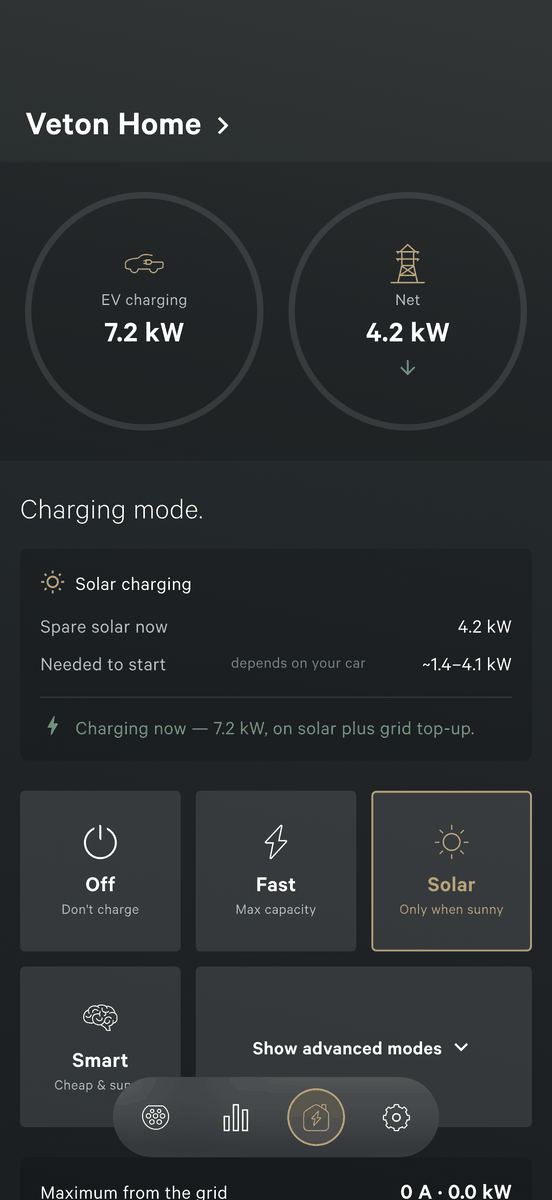
The charger decides on its own, inside the cabinet. Once you pick a mode it keeps following it when your phone is off, the app is closed or the internet is down.
Above the tiles a status line always says what the charger is doing, for example Charging at 7.2 kW or Paused, waiting for enough solar (or grid headroom). If you ever wonder why the car is not charging, read that line first.
The four everyday modes
Off: don't charge
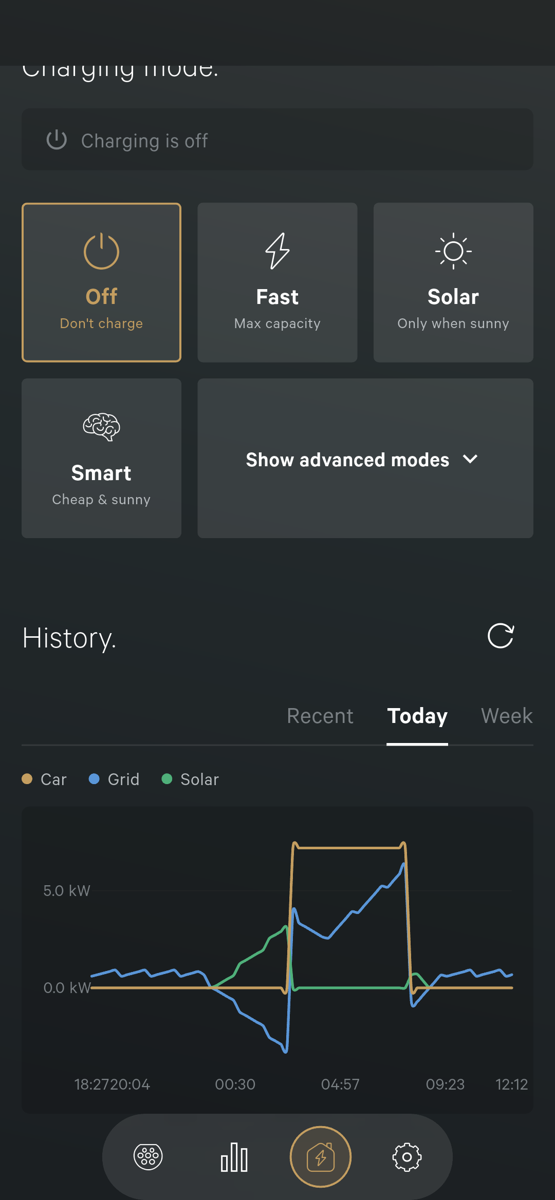
The car does not charge while the mode is Off. Use it when you plug in but want to wait, or when you manage power some other way. This is the only way to stop a charge from the app.
Fast: max capacity
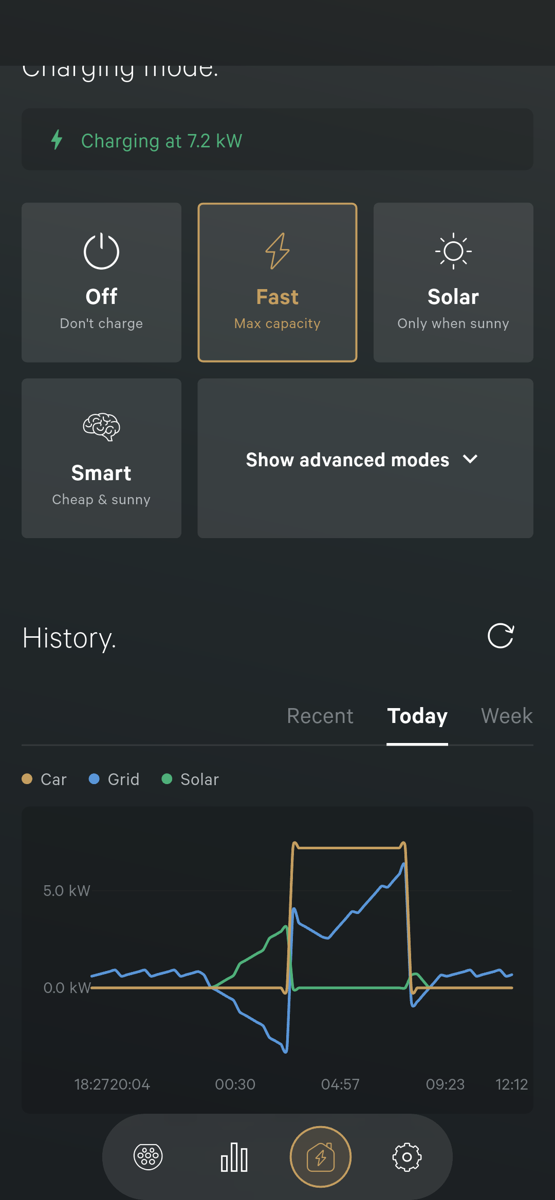
Charges as fast as your installation allows, up to the limit your installer set. Use it when you leave soon and do not care about solar or prices.
Solar: only when sunny
Charges the car from your solar surplus: the power your panels make that the home is not using. On a sunny day the car fills up from your own roof.
- The card shows Spare solar now and how much the car needs to start. A line like Your car takes at least 6 A (4.1 kW) tells you the minimum your car accepts, and whether that value was detected while charging, set for your car, or set by your installer.
- The slider Maximum from the grid allows a top-up. It is how much of that minimum you let the grid supply, so charging can start on less sun. Leave it at 0 for solar only.
- Set the slider higher and the car keeps charging gently when a cloud passes instead of stopping and restarting.
- No sun and no top-up means no charging. The status line says Paused, waiting for enough solar (or grid headroom). That is not a fault.
Solar needs a building meter. Your installer sets it up during commissioning.
Smart: cheap and sunny
The most hands-off mode. The charger looks at tomorrow's electricity prices and the solar forecast, learns when you usually leave, and plans the charge into the cheapest and sunniest hours so the car is ready in time.
Use it when you want the lowest cost without thinking about it: plug in when you get home and let the charger work out the best hours.
The advanced modes
Tap Show advanced modes to reveal two more tiles.
Capacity: limit peak
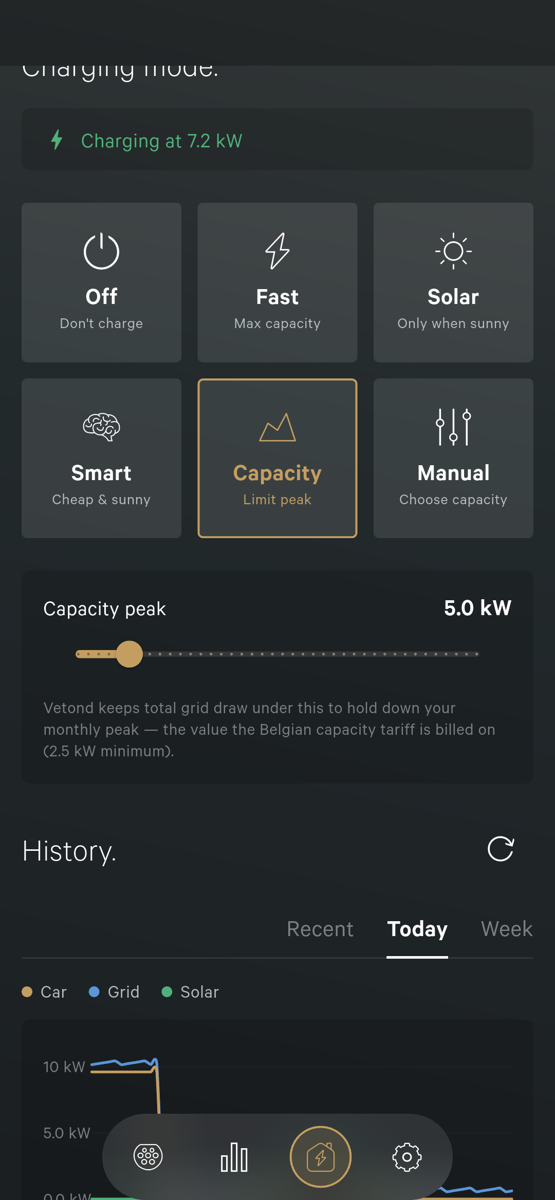
Keeps the total power your home takes from the grid under a limit you set. In Belgium (Flanders) part of the bill depends on your highest quarter-hour peak of the month, the capacity tariff. Capacity mode slows the car when the home is busy and speeds it up when the home is quiet, so charging never sets a new peak. Set the limit with the Capacity peak slider on the card. The minimum is 2.5 kW.
Manual: choose capacity
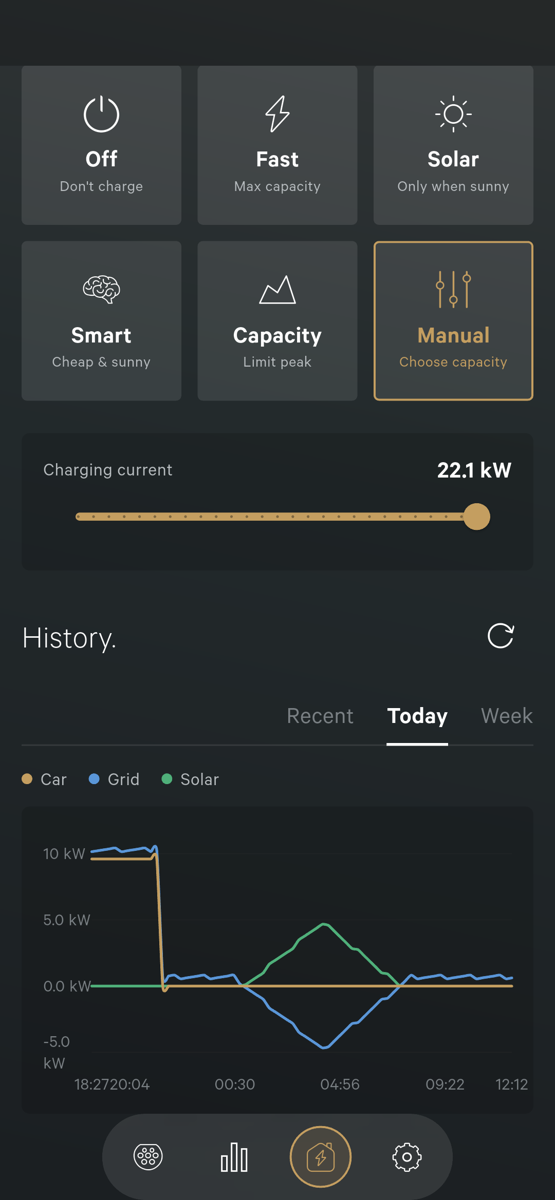
You set the charging current yourself with the Charging current slider. The charger holds the car at that level. Use it for a deliberately gentle overnight charge. The slider does not go below 6 A, the lowest current the charger can offer. Some cars need more than that to start; if yours does, it simply waits until you raise the slider.
Which mode should I use?
- No solar panels, fixed price: Fast.
- Solar panels, want to use your own power: Solar, with a small grid top-up if you also need the car ready on grey days.
- Dynamic or day-and-night tariff: Smart.
- Capacity tariff and a busy home: Capacity, or Smart, which respects the peak too.
- A specific steady speed: Manual.
The Smart plan card
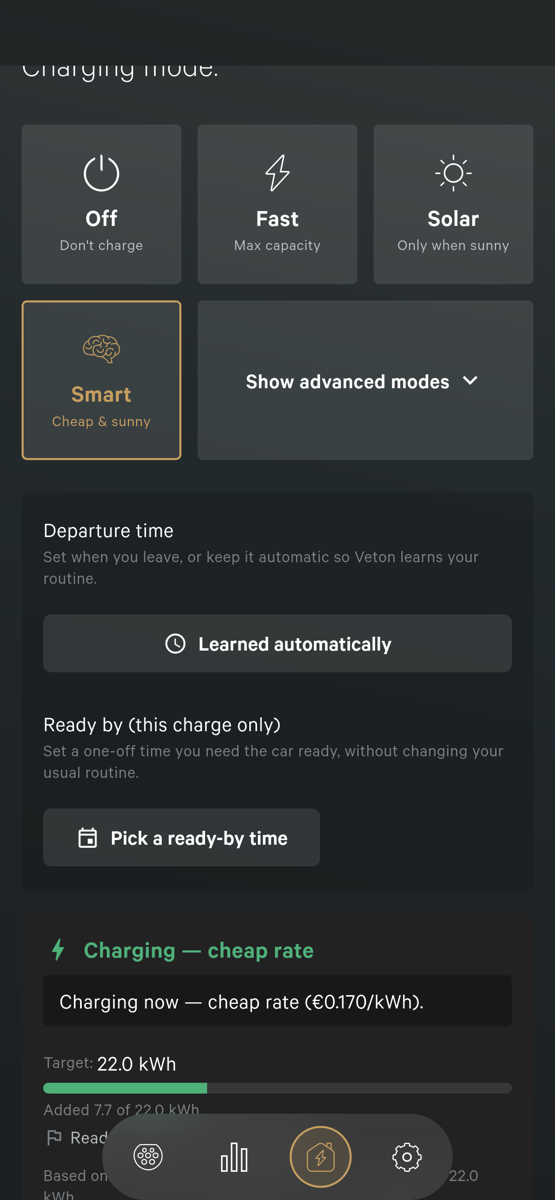
In Smart mode two cards appear under the tiles.
- Departure time. Leave it on Learned automatically and the charger uses the time it learned from your routine. Set it yourself when tomorrow is different, for example an early start. A time you set is always trusted.
- Ready by (this charge only): a one-off time for this charge, see below.
- A reason line in plain words, for example Waiting for cheaper hours. or Charging now, cheap rate (€0.170/kWh).
- The energy Target for this charge and how much has been added so far.
- Next 24 hours: a bar chart where bar height is the price for that hour, with the solar forecast drawn over it. The hours the charger plans to charge are highlighted.
Smart also works without a dynamic tariff. The card says which prices it uses: live market prices for your price market, or your day and night tariff. With a fixed tariff the plan simply follows the sun.
- Price market: Belgium or the Netherlands. Once you are signed in and the charger is claimed, the Smart card asks Choose your price market; tap Change on the card to switch later. On a charger your installer manages, the market is set during cloud setup and the card says so.
- Solar panels, home battery and location are entered once by your installer under Installer Settings, on the Main fuse card, section Solar & battery. The setup with the QR label also asks for the address, your electricity price and your solar panels, in three optional steps.
The first few sessions the charger is still learning your routine and the card says Learning your routine, charging normally for now. After a handful of sessions it shifts charging into the cheap hours.
Charge now anyway
Sometimes you need the car sooner than the plan allows. Smart has a one-off override that does not change your usual routine.
- Open the Load balancing tab while Smart is active.
- On the plan card, tap Pick a ready-by time under Ready by (this charge only).
- Pick the date, then the time you need the car, and tap OK. The card shows the time and keeps it for this charge only.
The charger reschedules so the car is ready by that time, and goes back to your learned routine for the next charge.
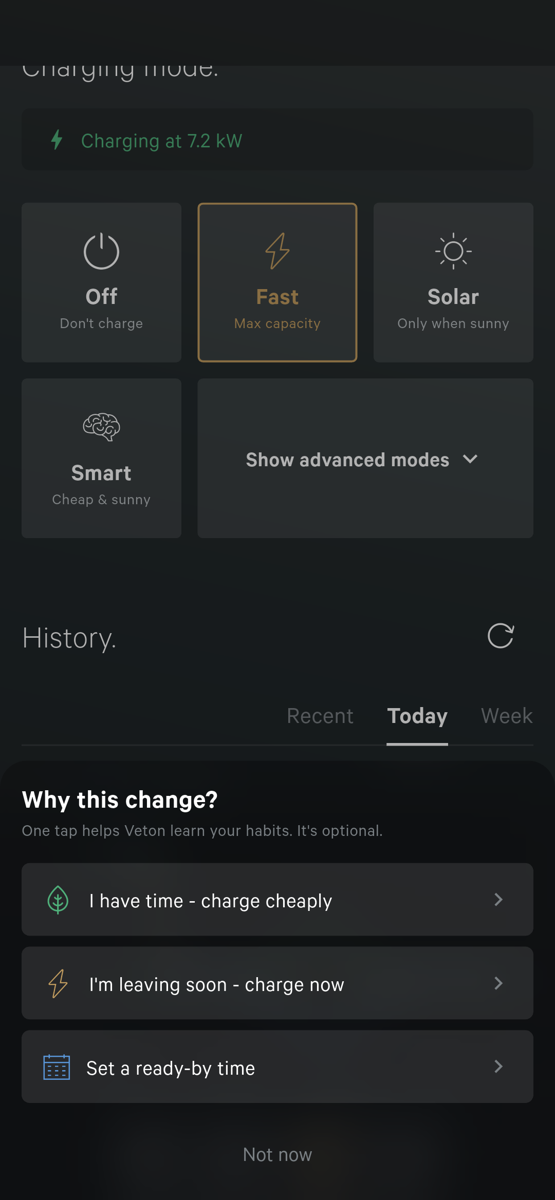
You can also switch to Fast or Manual. The app then asks Why this change? with three quick answers: I have time, charge cheaply; I'm leaving soon, charge now; or Set a ready-by time. Tap Not now to skip. Answering is optional, but it helps the charger learn your habits. Fast or Manual stays on until you switch back to Smart.
Why did it pause?
- Charging is off: the mode is Off. Pick another mode.
- Paused, waiting for enough solar (or grid headroom): not enough surplus. Wait for sun, raise the grid slider, or switch to Fast or Smart.
- Paused, keeping your grid use under the limit: Capacity mode is holding the peak. It resumes when the home quiets down.
- Waiting for cheaper hours. on the Smart card: Smart is holding for a better hour and will finish before your departure time. Set a ready-by time if you cannot wait.
- Briefly waking the car so it doesn't fall asleep: normal. During a long pause the charger offers a short trickle so the car does not fall asleep and miss the restart.
- Offering 6 A, your car isn't taking it yet: the charger is ready but the car is not drawing power. Some cars need a higher minimum; the line then says what the car waits for.
- Controlled by external EMS: another system drives this charger. The app shows live data only.
Next: sessions and energy history
Something not working? Ask your installer first. You can also reach Veton through the contact page.
Contact Veton S’ouvre sur un autre site